


Gin Rummy Stars - Card Game
4.933.31K Reviews
App Specs
- Version
- 3.24.11
- Updated On
- License
- Free
- Downloads
- 10,000,000+
- Developer
- Beach Bum Ltd.
- Categories
- Card
- Platform
- Android, iOS
Screenshots

 Analysis by AppCompare
I usually judge a card game by how comfortably I can follow a hand, not just by how quickly it gets me into a match. Gin Rummy asks you to keep track of what you hold, what has been discarded and what your opponent may be collecting. On a phone, that can be a lot to take in at once. Gin Rummy Stars - Card Game brings this traditional game to a mobile setting, and its strongest appeal is the chance to play a familiar, thoughtful game without needing a physical deck or a table.
Readability, navigation, and the rhythm of play
The game comes from Beach Bum Ltd. and is listed as a free card game, with an Everyone age rating. Its average rating is 4.9 from around 360,000 ratings, and it has more than five million installs. Those figures suggest it has found a large audience, but the more useful question is whether its presentation suits the way you like to play. I find that the basic appeal is easy to understand: sit down for a hand, make decisions as the cards change, and learn the game through practice rather than needing a long setup.
The first-time experience is presented as approachable, and the original review’s impression of a tutorial is useful for anyone who has never played gin rummy. Learning the sequence of drawing, discarding and forming sets or runs is easier when you can see it unfold in a hand. I would still take a moment to read each instruction rather than tap quickly through it. In a card game, understanding why a move is legal matters more than simply knowing which button to press.
Keeping a hand easy to follow
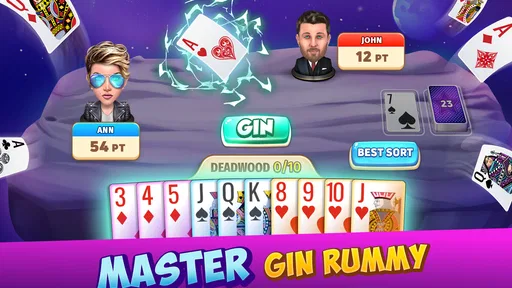
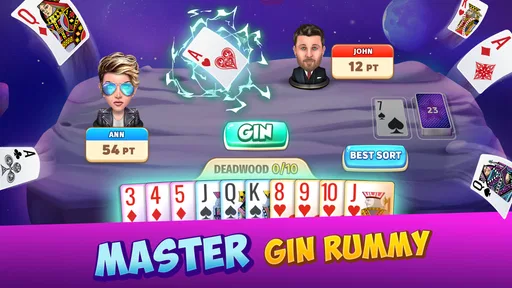
Card games depend on visual clarity: you need to distinguish your own cards, scan the discard pile and notice what changes after each turn. The original experience describes the graphics as crisp and the cards as carefully presented. That matters more here than decorative detail. When I play, I want the table to feel lively without making the card faces harder to read, and the game’s bright presentation aims for that balance.
There is a practical way to make the screen less mentally demanding: pause for a second before each discard and compare your possible melds with the card you are considering throwing away. That tiny routine helps prevent a rushed move, especially when you are still learning. It is also a good way to separate a deliberate decision from a reflexive tap if you tend to play quickly on a small screen.
Navigation feels geared toward getting into a game rather than making you study a complicated menu. That is convenient for returning players, while new players may benefit from exploring the options slowly before challenging someone. I would treat the tutorial as a starting point, then use low-pressure hands to build confidence. The game’s central appeal is not that every decision is obvious, but that the rules become easier to read once you have watched a few rounds play out.
Motor and sensory considerations
Gin Rummy Stars is a game of taps and visual choices rather than physical card handling. That can make it a more practical option for someone who enjoys card strategy but does not have a deck or another player nearby. The original review found the controls responsive and play smooth in its sessions. Even so, card games reward careful input: if you have difficulty with precise touch controls, a fast match may feel less comfortable than playing with large physical cards at your own pace.
Worth Reading Before You Choose

Flipboard Shows What News Apps Must Do Beyond the Feed

Switching to Android Auto Means Rethinking Your Driving Routine

Google Calendar Makes a Crowded Week Easier to Manage

Ludo King Makes the Most of the Minutes Between Plans

Baby Panda World Brings Quick Play to Modern Phones, but Its Game Library Feels Busy

ESPN’s Live Game View Makes Following Close Games Easier
The sound is described as gentle, with card and coin effects adding feedback. I like audio cues when they reinforce an action, but they are not essential to understanding the logic of gin rummy. If sound distracts you, playing with audio turned down or off is a sensible personal adjustment if your device offers that control. Likewise, anyone sensitive to busy visuals may prefer shorter sessions and breaks rather than trying to focus through several hands in a row.
Playing alone, with friends, or against strangers
The game is presented as supporting AI opponents, friends and real-time matches with other players. That range gives it more flexibility than a solo card app, though it also changes the feel of a session. An AI opponent can suit a quiet practice round, while a friend makes the game more social. Playing a stranger can add unpredictability, which is appealing when you want to test your decisions against someone who is not following your usual habits.
A realistic use for me would be a short break while waiting for an appointment: one hand is easier to fit into an uncertain gap than a longer activity that needs setup and uninterrupted attention. If I were playing with a friend, I would choose a time when we could both focus, since real-time play is less suited to being repeatedly interrupted. Daily challenges offer another reason to return, but I would treat rewards as a bonus rather than a reason to keep playing when I have had enough.
Compared with a traditional deck, a mobile match is convenient and handles the dealing for you, but it cannot reproduce the relaxed conversation around a table. Compared with a simple offline card game, the social and competitive options can make this feel more active, while also making the experience depend on being comfortable with online play. If your priority is quiet practice without other players, a solo-focused gin rummy game may be a better fit. If you want to play with people, this one has a clearer case.
Where the experience asks for patience
The social features, including chat and gifts, can add warmth when you already know the people you are playing with. They are not essential to the card game, though, and players who want a strictly solitary experience may find them unnecessary. Leaderboards can also be motivating, but I would not use rank as a measure of whether I am improving: a few results do not tell the whole story of how well I am reading discards or managing a hand.
There are in-app purchases, with items priced from 99 cents to $379.99. That is a wide range, so I would be careful to check the exact item and price before confirming any purchase. The game is free to start, and spending is optional according to the original experience, but the presence of purchases is worth keeping in mind if you are choosing a game for a child or trying to avoid optional spending. The Everyone rating is useful context, not a substitute for setting boundaries around purchases and screen time.
For players who want a quiet, fully self-paced activity, the online match format may not always be ideal. A physical deck lets you stop between turns without considering another player’s pace; a digital opponent may make the session feel more structured. The best fit is someone who is happy to give a hand their attention and enjoys deciding whether to keep a card, discard it or adapt to a changing table. It is less suitable if you mainly want a game that can be ignored and resumed at any moment.
Who is likely to enjoy it?
I would recommend it to someone who already likes gin rummy, wants an accessible way to practise, or enjoys a mix of solitary and social card play. It can also suit a beginner willing to learn one hand at a time. Players who need large, highly adjustable text or controls should check how the interface feels on their own device before settling in; I would not assume that a mobile card table will suit every vision or dexterity need.
The app’s current version is 3.21.14, and it requires Android 7.0 or later on Android devices. That gives Android users a straightforward compatibility check before installing. It is also available on iOS, so the choice is not limited to one mobile platform. I would still make sure the device is comfortable to hold and that the screen gives you enough room to inspect your hand, since those everyday details can matter more than a game’s general reputation.
One useful habit for improving is to notice not only which cards complete your own combinations, but also what your opponent chooses to take from the discard pile. That gives you clues about what may be useful to them and can make your own discards more thoughtful. It is not a guaranteed way to win; it is simply a more rewarding way to engage with gin rummy than choosing a card at random. The app works best when I treat each hand as a small decision-making exercise, not as a race to collect rewards.
If you are wondering whether you need to spend money to enjoy it, the original review’s experience was that purchases were optional. If you are wondering whether it is suitable for a beginner, the tutorial and practice against AI are described as helpful starting points. And if you want to know whether it can be played socially, the game offers friend and real-time opponent options. Those are distinct reasons to try it, but they do not remove the need to decide whether online competition and a touchscreen suit your habits.
Have you ever found yourself craving a classic card game but with a modern twist? Well, let me introduce you to Gin Rummy Stars - Card Game. This app is a delightful blend of traditional gin rummy with a sprinkle of online gaming magic. It's like having your own personal deck of cards right in your pocket, and trust me, it’s a game-changer.
Getting Started with Gin Rummy Stars
First things first, downloading Gin Rummy Stars is a breeze. Available on both Android and iOS, this app is super easy to set up. Once you're in, you’re greeted by a slick and intuitive interface that makes navigation a piece of cake. And if you’re new to gin rummy, don’t sweat it! The game includes a tutorial that guides you through the basics. It’s like having a friend teach you the ropes, minus the awkward small talk.
Gameplay and Features
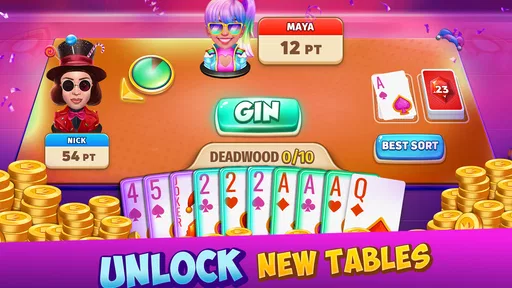
Now, let's dive into what makes this app tick. The game offers several modes, from playing against the AI to challenging friends or even strangers in real-time matches. There’s something truly exhilarating about facing off against a real opponent and testing your strategy skills.
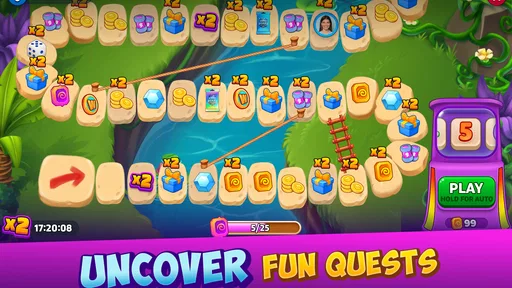
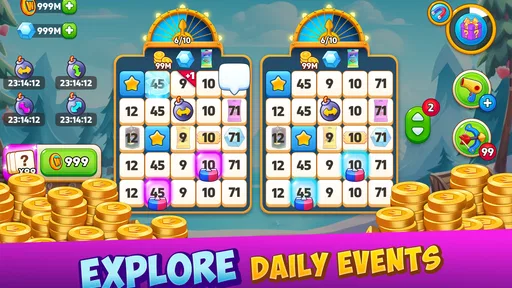
One of the standout features is the daily challenges. These keep the game fresh and engaging, offering rewards that can be used to unlock new decks and avatars. There’s a certain satisfaction in completing these challenges, and they add an extra layer of fun to the game.
Another cool aspect is the social element. You can connect with friends, chat, and even send gifts. It’s the perfect way to stay competitive and keep the friendly banter alive. Plus, the leaderboard keeps things spicy, pushing you to climb the ranks and show off your skills.
Graphics and Sound
Visually, Gin Rummy Stars is a treat. The graphics are crisp and vibrant, making the game feel lively and engaging. Each card and deck is designed with attention to detail, adding to the overall appeal.
As for the sound, it’s soothing and unobtrusive. The background music is calming, which is ideal for a game that requires concentration. The sound effects, like the shuffling of cards and the clinking of coins, are spot on, enhancing the immersive experience.
User Experience
In terms of user experience, this app hits the nail on the head. It’s user-friendly, with responsive controls and minimal lag, even during intense matches. The developers have clearly prioritized smooth gameplay, and it shows.
One thing I particularly appreciate is the lack of intrusive ads. Sure, there are some, but they’re not overwhelming and don’t interrupt your gaming flow. Plus, there are in-app purchases for those who want to accelerate their progress or customize their gameplay, but they’re entirely optional. You can enjoy the full experience without spending a dime, which is always a win in my book.
Why You Should Try It
If you’re a fan of card games or just looking for a fun way to pass the time, Gin Rummy Stars is definitely worth a download. It combines the charm of traditional gin rummy with the convenience of mobile gaming, and it’s incredibly addictive. The game offers a perfect balance of strategy and luck, making each round unique and exciting.
So why not give it a shot? Whether you’re a seasoned player or a complete newbie, there’s plenty to love about this app. It’s like having a deck of cards and a group of friends at your fingertips, ready to play anytime, anywhere. Go ahead, download it, and let the card games begin!
Pros
- Smooth and intuitive user interface.
- Variety of game modes available.
- Regularly updated with new features.
- Engaging graphics and sound effects.
- Strong community and social features.
Cons
- In-app purchases can be expensive.
- Occasional ads interrupt gameplay.
- Requires a stable internet connection.
- Limited offline functionality.
- Some features locked behind paywall.
FAQs for Gin Rummy Stars - Card Game
What is Gin Rummy Stars and how does it work?
Gin Rummy Stars is a digital version of the classic card game, Gin Rummy. Players can engage in real-time matches against friends or strangers. The app offers intuitive controls and a seamless interface, making it easy for both beginners and seasoned players to enjoy. Players collect points by forming sets and runs of cards, aiming to reach the target score before their opponent.
Is Gin Rummy Stars free to play?
Yes, Gin Rummy Stars is free to download and play. However, it offers in-app purchases that can enhance gameplay. These purchases may include special card decks, themes, or currency for in-game transactions. While the base game is fully functional without spending money, some players may choose to invest in these extras for a personalized experience.
Can I play Gin Rummy Stars offline?
Gin Rummy Stars primarily focuses on online multiplayer interactions. Therefore, an internet connection is required to compete against other players. However, some versions of the game may offer an offline mode where players can practice against AI opponents. This can be useful for honing skills before engaging in live matches.
How does matchmaking work in Gin Rummy Stars?
Matchmaking in Gin Rummy Stars pairs players based on their skill level and ranking. The system ensures fair competition by matching you with opponents who have similar experience and statistics. This helps maintain balanced and exciting gameplay, preventing new players from facing off against seasoned pros right away.
What are the system requirements for Gin Rummy Stars?
Gin Rummy Stars is compatible with both Android and iOS devices. For Android users, the app typically requires version 5.0 or higher, while iOS users need version 10.0 or later. Ensure your device has sufficient storage and is connected to a stable internet connection for optimal performance during gameplay.


